Index
Home
What is The Web
Getting Started
Introduction to HTML
Miscellaneous
Things I want to know more about
Side Notes
Website Development Tools
Website Design Tools
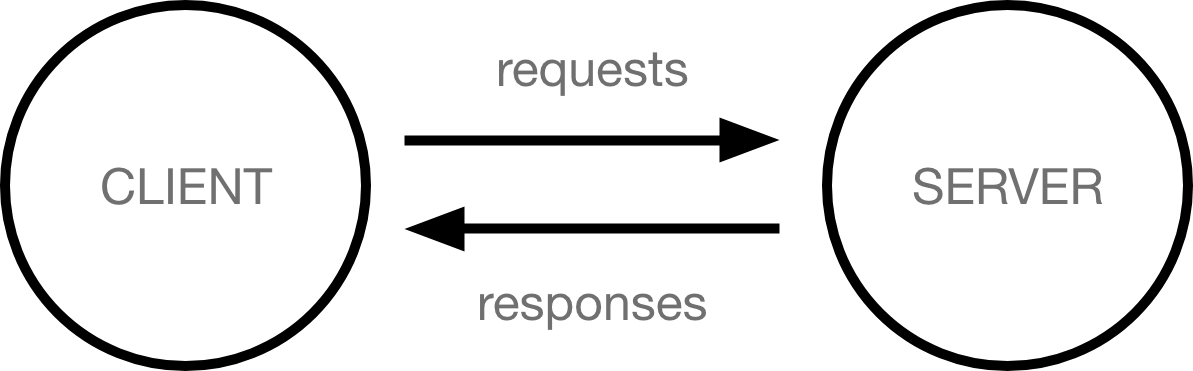
What is the Web
- How does the Internet Work
- What is HTML
- HTML (HyperText Markup Language) is a descriptive language that specifies webpage structure.
- At its heart, HTML is a language made up of elements, which can be applied to pieces of text to give them different meaning in a document (Is it a paragraph? Is it a bulleted list? Is it part of a table?), structure a document into logical sections (Does it have a header? Three columns of content? A navigation menu?), and embed content such as images and videos into a page.
- What is JavaScript
- JavaScript (or “JS”) is a programming language used most often for dynamic client-side scripts on webpages, but it is also often used on the server-side, using a runtime such as Node.js.
- JavaScript is a programming language that adds interactivity to your website. This happens in games, in the behavior of responses when buttons are pressed or with data entry on forms; with dynamic styling; with animation, etc.
- What is CSS
- CSS (Cascading Style Sheets) is a declarative language that controls how webpages look in the browser.
- What is the DOM (Document Object Model)
- The DOM (Document Object Model) is an API that represents and interacts with any HTML or XML document. The DOM is a document model loaded in the browser and representing the document as a node tree, where each node represents part of the document (e.g. an element, text string, or comment).
- What is an API
- An API (Application Programming Interface) is a set of features and rules that exist inside a software program (the application) enabling interaction with it through software - as opposed to a human user interface. The API can be seen as a simple contract (the interface) between the application offering it and other items, such as third party software or hardware.
Getting Started
- Compose a short poem describing how HTTP sends data between computers.
- Hungry for cake? Find a place that will bake, then travel to its location.
Ready to buy, just ask the guy(or girl) for a cake to quench your satiation.
Baker gets busy, bakes a cake thats the shizzy, then you take it back to your place.
Having arrived, cut the cake to divide and stuff it into your face.
- Hungry for cake? Find a place that will bake, then travel to its location.
- Describe how HTML, CSS, and JS files are “parsed” in the browser.
- The browser parses the HTML file first, and that leads to the browser recognizing any <link>-element references to external CSS stylesheets and any <script>-element references to scripts.
- As the browser parses the HTML, it sends requests back to the server for any CSS files it has found from <link> elements, and any JavaScript files it has found from <script> elements, and from those, then parses the CSS and JavaScript.
- The browser generates an in-memory DOM tree from the parsed HTML, generates an in-memory CSSOM structure from the parsed CSS, and compiles and executes the parsed JavaScript.
- As the browser builds the DOM tree and applies the styles from the CSSOM tree and executes the JavaScript, a visual representation of the page is painted to the screen, and the user sees the page content and can begin to interact with it.
- How can you find images to add to a Website?
- Google Images
- Note that most images on the web, including in Google Images, are copyrighted. To reduce your likelihood of violating copyright, you can use Google’s license filter. Click on the Tools button, then on the resulting Usage rights option that appears below. You should choose the option Creative Commons licenses.
- Google Images
- How do you create a String vs a Number in JavaScript?
- To signify that the value is a string, enclose it in single quote marks. let myVariable = ‘Bob’;
- Numbers do not have quotes. let myVariable = 10;
- What is a Variable and why are they important in JavaScript?
- Variables are containers that store values. Variables are necessary to do anything interesting in programming. If values couldn’t change, then you couldn’t do anything dynamic, like personalize a greeting message or change an image displayed in an image gallery.
Introduction to HTML
- What is an HTML attribute?
- An attribute extends an HTML or XML element, changing its behavior or providing metadata.

- An attribute extends an HTML or XML element, changing its behavior or providing metadata.
- Describe the Anatomy of an HTML element.
- Opening tag, Content, Closing Tag or described another way as Opening tag, An attribute and its value, Enclosed text content, Closing tag.
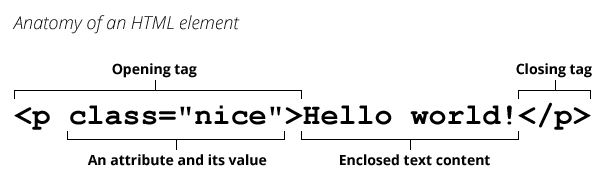
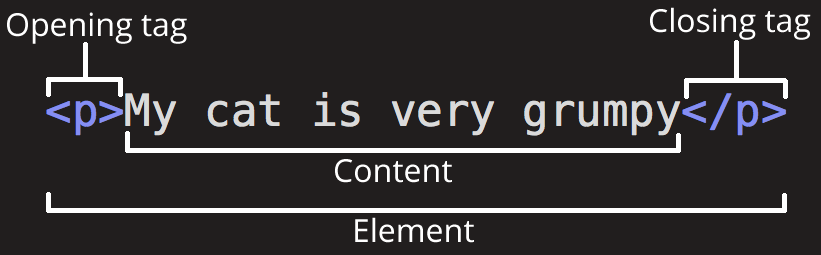
- Opening tag, Content, Closing Tag or described another way as Opening tag, An attribute and its value, Enclosed text content, Closing tag.
- What is the Difference between <article> and <section> element tags?
- <article> encloses a block of related content that makes sense on its own without the rest of the page (e.g., a single blog post).
- <section> is similar to <article>, but it is more for grouping together a single part of the page that constitutes one single piece of functionality (e.g., a mini map, or a set of article headlines and summaries), or a theme. It’s considered best practice to begin each section with a heading; also note that you can break <article>s up into different <section>s, or <section>s up into different <article>s, depending on the context.
- What Elements does a “typical” website include?
- How does metadata influence Search Engine Optimization?
- Search Engine Optimization or SEO
- Specifying a description that includes keywords relating to the content of your page is useful as it has the potential to make your page appear higher in relevant searches performed in search engines.
- How is the <meta> HTML tag used when specifying metadata?
- Metadata is data about the HTML, such as the author, and important keywords that describe the document.
- <meta> is an HTML element represents metadata that cannot be represented by other HTML meta-related elements, like <base>, <link>, <script>, <style> or <title>.
Miscellaneous
How to start to design a Website
- What is the first step to designing a Website?
- Planning, before doing anything, you need some ideas. What should your website actually do?
- What is the most important question to answer when designing a Website?
- What is it you want to accomplish.
- What is your website about? Do you like dogs, New York, or Pac-Man?
- What information are you presenting on the subject? Write a title and a few paragraphs and think of an image you’d like to show on your page.
- What does your website look like, in simple high-level terms? What’s the background color? What kind of font is appropriate: formal, cartoony, bold and loud, subtle?
- What is it you want to accomplish.
Semantics
- Why should you use an <h1> element over a <span> element to display a top level heading?
- By default, most browser user agent stylesheets apply semantic value to <h1> giving it a large font size to make it look like a heading (although you could style it to look like anything you wanted) whereas <span> is a generic element that carries no semantic value without explicitly defining it with attributes.
- What are the benefits of using semantic tags in our HTML?
- Search engines will consider its contents as important keywords to influence the page’s search rankings (see SEO).
- Screen readers can use it as a signpost to help visually impaired users navigate a page.
- Finding blocks of meaningful code is significantly easier than searching through endless divs with or without semantic or namespaced classes.
- Suggests to the developer the type of data that will be populated.
- Semantic naming mirrors proper custom element/component naming.
What is JavaScript?
- Describe 2 things that require JavaScript in the Browser?
- A clock: Displaying timely content updates
- Google Maps: Interactive maps
- animated 2D/3D graphics
- YouTube: Scrolling video jukeboxes
- How can you add JavaScript to an HTML document?
- JavaScript is applied to your HTML page in a similar manner to CSS. Whereas CSS uses <link> elements to apply external stylesheets and <style> elements to apply internal stylesheets to HTML, JavaScript only needs one friend in the world of HTML — the <script> element.
- Internal JavaScript - Using the <script> element without a source attribute inside the <head> tag.
- External JavaScript - Using the <script> element without with a source attribute (example: src=”script.js”) inside the <head> tag.
Things I want to know more about
- What is the proper “industry” etiquette for using <style> and <\script>. The docs mention it is generaly a bad idea not to have dedicated files to these but is there ever an acceptable reason not to?
Side Notes
- Tags in HTML are not case-sensitive. This means they can be written in uppercase or lowercase. However, it is best practice to write all tags in lowercase for consistency and readability.
- Block vrs inline elements
- Block-level elements form a visible block on a page.
- A block-level element always starts on a new line and takes up the full width available (stretches out to the left and right as far as it can).
- Inline elements are those which only occupy the space bounded by the tags defining the element, instead of breaking the flow of the content.
- An inline element does not start on a new line and only takes up as much width as necessary.
- Block-level elements form a visible block on a page.
- Elements can be placed within other elements. This is called nesting.
- Empty elements are sometimes called void elements.
- Double quotes or single quotes around an attribute? The only difference is style so it doesn’t matter but consistency is important for readability.
Website Development Tools
Website Design Tools
- Design
- Colors
- Fonts
- Debug & Testing
- Cheat Sheets